Hands-On: Build a Weekly Exception Digest Where Rules Decide, AI Explains, and a Person Approves
Part of the Hands-On AI for Data Pros series.
Most credit union reporting still ends with a person scrolling through a long list looking for the odd rows. This post builds a small workflow that does the finding automatically, uses AI only for the wording, and keeps a person in charge.
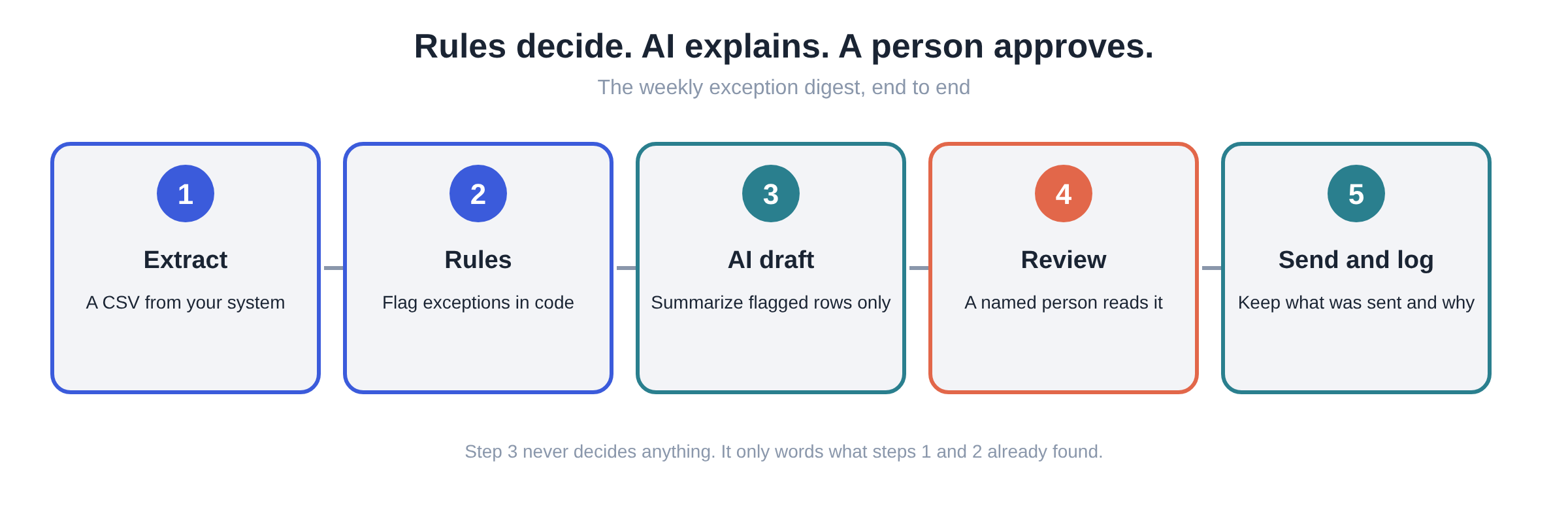
The design rule is simple: rules decide, AI explains, a person approves. The AI never decides what is an exception, so you can explain every flag to an examiner.
Before you start
- Use a synthetic or approved extract. Do not paste member data into a tool your credit union has not approved. The sample file below is generated, not real.
- You need Python 3 with pandas installed.
- Plan about an hour.
Step 1: make a sample file
This script creates 60 days of fake transactions for 60 accounts, with three exceptions planted so you can confirm the rules find them.
# make_sample.py is included with this post as a download.
# It writes transactions_sample.csv with columns:
# date, account_id, channel, type, amount
Download it here: make_sample.py.
Run python make_sample.py. The planted cases are a large withdrawal on account A0007, two identical withdrawals on A0012, and an unusually large deposit on A0031.
Step 2: let rules find the exceptions
The script looks at the last seven days and applies three plain rules: a single transaction at or above a limit, an amount far above that account's own history, and possible duplicates.
"""Weekly exception digest: rules decide, AI explains, a person approves.
Reads a CSV extract with columns: date, account_id, channel, type, amount.
Writes exceptions.csv and digest_prompt.txt. Uses synthetic or approved data only."""
import pandas as pd

LARGE = 5000          # flag single transactions at or above this amount
Z_LIMIT = 3.0         # flag amounts this many std devs above the account's history
df = pd.read_csv("transactions_sample.csv", parse_dates=["date"])
last_day = df["date"].max()
week = df[df["date"] > last_day - pd.Timedelta(days=7)].copy()
history = df[df["date"] <= last_day - pd.Timedelta(days=7)]

flags = []

# Rule 1: large single transactions
for _, r in week[week["amount"] >= LARGE].iterrows():
    flags.append((r["date"].date(), r["account_id"], "large_transaction",
                  f'{r["type"]} of {r["amount"]:.2f} via {r["channel"]}'))

# Rule 2: unusual for this account compared with its own history
stats = history.groupby("account_id")["amount"].agg(["mean", "std"])
for _, r in week.iterrows():
    if r["account_id"] in stats.index:
        m, s = stats.loc[r["account_id"]]
        if pd.notna(s) and s > 0 and (r["amount"] - m) / s >= Z_LIMIT:
            flags.append((r["date"].date(), r["account_id"], "unusual_for_account",
                          f'{r["amount"]:.2f} vs account average {m:.2f}'))

# Rule 3: possible duplicates (same account, day, type, amount)
dups = week[week.duplicated(["date", "account_id", "type", "amount"], keep=False)]
for (d, a, t, amt), _ in dups.groupby(["date", "account_id", "type", "amount"]):
    flags.append((d.date(), a, "possible_duplicate", f"{t} of {amt:.2f} appears more than once"))

out = pd.DataFrame(flags, columns=["date", "account_id", "rule", "detail"]).drop_duplicates()
out = out.sort_values(["date", "account_id", "rule"])
out.to_csv("exceptions.csv", index=False)

prompt = (
    "You are drafting a short weekly exception summary for a credit union "
    "operations manager. Use ONLY the rows below. Do not add facts, causes, "
    "or advice about specific people. Group by rule, give one plain sentence "
    "per group, and end with the question a reviewer should ask first.\n\n"
    + out.to_csv(index=False)
)
open("digest_prompt.txt", "w").write(prompt)
print(f"{len(out)} exceptions written to exceptions.csv")
print(out.groupby("rule").size().to_string())
Download the full script: exception_digest.py.
On the sample file, we ran this and got six exceptions: two large transactions, one possible duplicate, and three unusual for the account. The planted cases all appeared. Your numbers will differ on real data, and the thresholds (5,000 and 3 standard deviations) are starting guesses for you to tune.
Step 3: let AI word the summary
The script writes digest_prompt.txt. Paste its contents into an approved AI assistant. The instructions in it matter as much as the data:
- "Use ONLY the rows below" keeps the model from inventing causes.
- "Do not add advice about specific people" keeps the draft neutral.
- "End with the question a reviewer should ask first" gives the human a place to start.
If your credit union has an approved API, you can send the prompt from the script instead of pasting it. The logic does not change.
Step 4: a person reviews
Before anything goes out, a reviewer should:
- Open
exceptions.csvand check that every sentence in the draft matches a row. - Delete anything the draft added that is not in the data.
- Decide what happens next. The digest points at rows; it does not say anyone did anything wrong.
Step 5: send and keep a log
Save the final digest, the CSV, the date, and the reviewer's name in a shared folder. That is your audit trail, and it takes two minutes.
Where this can go wrong
- Hidden bad data. If the extract is incomplete, the digest looks clean when it is not. Reconcile row counts to the source.
- Over-trusting the wording. A fluent summary can still be wrong. The CSV is the source of truth.
- Noise. Too many flags and people stop reading. Raise thresholds until the weekly list is short enough to review.
- Scope creep. Do not let the digest become a decision. Anything that affects a member needs a human and your normal procedures.
This pattern lines up with the human oversight and documentation ideas in the NIST AI Risk Management Framework, though we are not claiming it satisfies any exam expectation. Your compliance team should look at it before it touches real data.
Make it your own
Swap the rules for what matters to you: dormant accounts that suddenly move, loan payments missed twice, share draft overdrafts above a limit. The structure stays the same.
The takeaway
Useful AI automation is often small and a little boring: a rule finds, AI phrases, a person decides. Build that once and you can reuse it for a dozen weekly lists.
Sources