Hands-On AI for Data Pros: Use an Assistant to Write SQL on Call Report Data, and Check Its Work
This is the second post in our hands-on series for people who work with data. Last time was Power BI. This time it's the thing most analysts try first: asking an AI assistant to write SQL.
It's useful. It's also where AI looks most impressive and is most likely to fool you. A query that runs without errors can still answer the wrong question. So let's do it on public data, with checks built in.
Why use call report data
The NCUA publishes quarterly call report data for natural person credit unions. Its data page says the files go back to March 1994 and that each quarter's zip file contains comma delimited text files you can import into a spreadsheet or database. That makes it a good practice set: it's real, it's public, and nothing in it is a member's private information.
The page doesn't include a data dictionary. For what each field means, you'll need the NCUA's Call Report instructions or the contact the page lists. Keep that in mind, because it matters in a minute.
Why AI-written SQL needs checking
Here's an honest warning from research. A 2024 benchmark called BEAVER tested language models on questions drawn from real enterprise data warehouses. The best result was 2.0 percent correct, versus much higher scores on public academic benchmarks. The authors point to private data the models never saw, schemas averaging 105 tables per database, and business questions needing multiple joins. The most common errors were missing database-specific rules and linking to the wrong tables or fields.
Two cautions about that. The models tested were older, so today's tools are better. And a call report extract is simpler than a big warehouse. But the lesson holds: the less the assistant knows about your data's meaning, the more it guesses.
Try it: a safe first exercise
- Download one quarter of public data. Pick a recent quarter from the NCUA quarterly data page and load the files into whatever you use, such as a local database, Excel's Power Query, or a notebook.
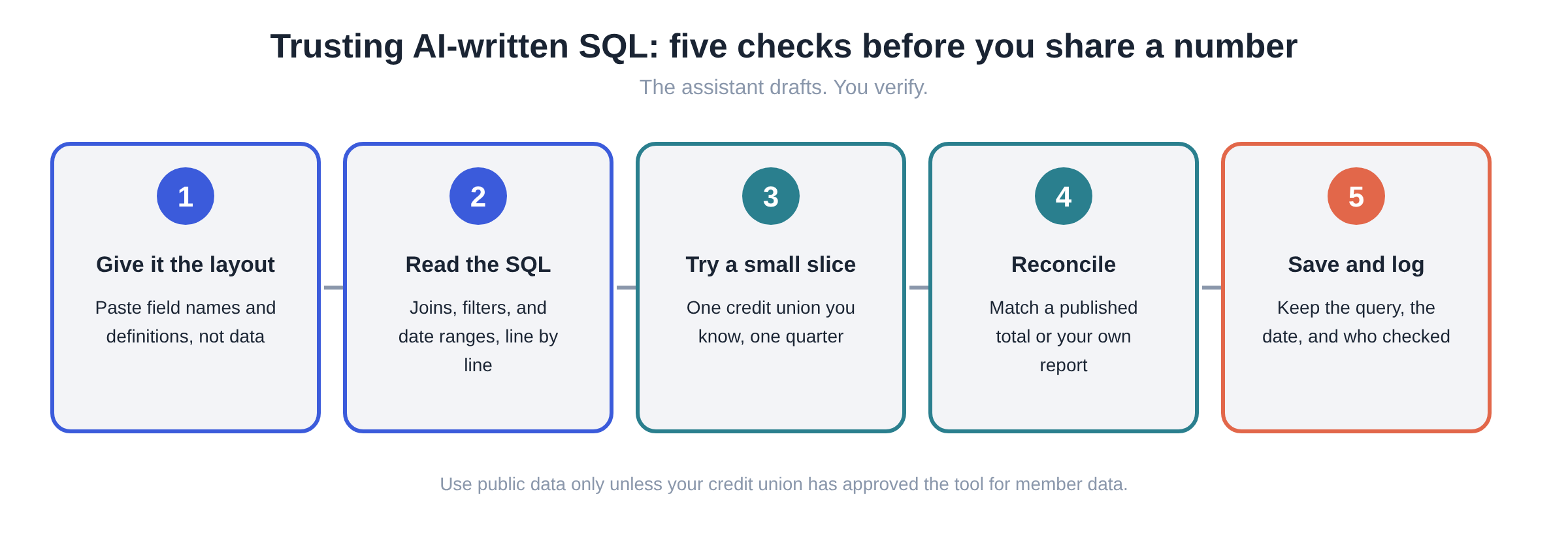
- Gather the layout. Collect the field names and their definitions from the NCUA's documentation. Paste those into the assistant, not the data itself.
- Ask a narrow question. Start with something you can check, like total assets for one credit union you know well, or the count of credit unions in your state.
- Use a prompt like this:
You are helping me write SQL. Use only the tables and fields
described below. Do not invent field names. If a field you need
is missing, say so instead of guessing.

[paste field names and definitions here]

Question: [your question in plain words]

Return: the SQL, then a plain-English explanation of each join,
filter, and date range, and a list of assumptions you made.
- Read the SQL before you run it. Check the joins, the filters, and especially the date or quarter selection. Wrong periods are a classic quiet error.
- Run it on a small slice. One credit union, one quarter.
The check that matters most: reconcile
Compare the result to something you already trust. If you asked for your own credit union's total assets, does it match your own call report? If you counted credit unions in a state, does it match the NCUA's published list? If it doesn't match, don't tweak the query until it does. Find out why. That difference usually teaches you something about the data.
Then ask the assistant to explain its own query back to you in plain English and compare that to what you actually wanted. Disagreements show up fast.
Habits worth building
- Pin the vocabulary. Tell the assistant what your terms mean, such as how you define "active member" or "loan growth." Undefined terms are where guesses creep in.
- Keep the SQL. Save the final query with the date, the data quarter, and who checked it. A number with no recipe is hard to defend.
- Ask for assumptions. Have the assistant list them, then confirm each one.
- Keep a human in the loop. The assistant drafts and you sign off. That's the same rule we suggest for every AI tool.
- Public data first. Before you point any assistant at member data, get your governance group to approve the tool and the data flow.
Where this goes next
Once the habit works on public data, you can apply it to internal reporting with approval. The same five checks apply, and they're also a good answer when someone asks how your team keeps AI-assisted analysis reliable. In our next post, we'll look at data quality, which is the other half of getting useful answers.
Sources